5 ERPNext Implementation Mistakes That Nearly Broke a Manufacturing Business
On a Monday morning, the factory was still.
Orders were confirmed. Materials were in stock. Workers were available.
Yet production had stalled—because no one could clearly see what should be made first.
A few months earlier, this manufacturing business had implemented ERPNext to bring order to rapid growth. Instead, the system exposed deeper problems. What followed were hard lessons—costly, uncomfortable, and nearly business-ending.
These ERPNext Implementation Mistakes Nearly Cost the Business Everything
Mistake 1: Poor Data Migration Planning
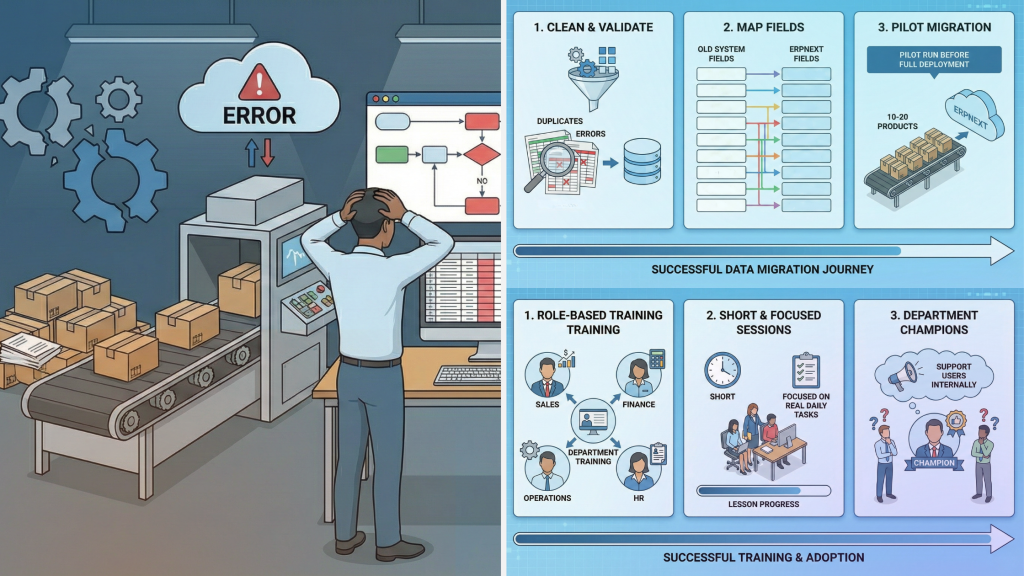
The team exported everything from the old system and imported it directly into ERPNext. Two weeks later, production stopped. A supplier’s lead time showed 2 days instead of 20 days. Raw materials didn’t arrive on time. Assembly lines sat idle. The reality was simple: years of bad data had been moved into a brand-new system. This is one of the most common ERPNext errors that businesses encounter during migration.
How to Avoid:
- Clean and validate data before migration (remove duplicates and errors)
- Carefully map old system fields to ERPNext fields
- Run a pilot migration with 10–20 products before full deployment
Mistake 2: Inadequate User Training
Three full days of ERPNext training were planned. Attendance dropped after the first session. Months later, teams were still using paper forms because they didn’t understand the system. The software existed—but adoption never happened. Poor training leads to ERPNext errors that could have been prevented with proper onboarding.
How to Avoid:
- Conduct role-based training for each department
- Keep sessions short and focused on real daily tasks
- Appoint department champions to support users internally
Mistake 3: Over-Customization
Everyone had requests: custom reports, special workflows, unique labels. Everything was approved. Six months later, every ERPNext update broke something. Support costs tripled. Even worse, most customizations were never used. Over-customization is one of the costliest ERPNext implementation mistakes businesses make.
How to Avoid:
- Align your processes with ERPNext’s standard features first
- Question every customization: Does this increase revenue or reduce cost?
- Customize only what is truly critical
Mistake 4: Failing to Integrate Systems
The factory ran on five separate systems:
- ERPNext for production planning
- A different system for quality control
- Inventory tracked in spreadsheets
The same data was entered multiple times. A quality issue was missed in ERPNext. Defective parts were shipped. These integration-related ERPNext errors cost more than all the customizations combined.
How to Avoid:
- Map all systems and data flows before implementation
- Integrate only critical systems with ERPNext
- Test every integration scenario thoroughly before go-live
Mistake 5: No Post-Implementation Support Plan
After go-live, the consultant handed over the system and moved on. Two weeks later, a cost calculation formula broke. Support hours were exhausted. The company was left paying for a system it couldn’t use.
How to Avoid:
- Secure ongoing support before the implementation ends
- Plan for updates, maintenance, and troubleshooting
- Train internal staff to manage basic ERPNext configurations
The Result
Today, the factory runs smoothly on ERPNext. Dashboards revealed the top-selling product had the weakest margins. Adjusting pricing and production improved margins within weeks.
The lesson: ERPNext wasn’t the problem—avoiding these ERPNext implementation mistakes was the key.
A Note From One Business Owner to Another
If you’re considering ERPNext, this story may feel familiar.
Systems don’t fail businesses—lack of planning and ownership does.